Accounts payable automation for small business and bookkeepers
Accounts payable automation replaces the manual steps between receiving a supplier invoice and having its data in your accounting system. Here is what it actually involves, what to look for, and when it pays for itself.
What accounts payable automation actually means
Accounts payable (AP) automation is software that captures a supplier invoice, extracts its data — vendor, invoice number, dates, tax and totals, and line items — validates those numbers, and pushes them into your accounting system so nobody retypes them. It is not the same as a scanner or a shared inbox: those store the invoice, but a person still keys the figures. Automation removes the keying step and the errors that come with it.
The manual AP workflow (and where it breaks)
The typical small-firm process looks like this: an invoice arrives by email → someone downloads the PDF → they read it and type vendor, date, amount and tax into QuickBooks, Xero or a spreadsheet → they file the PDF → later, someone reconciles it against the bank. A person spends roughly 2–5 minutes per invoice, and the two things that break are volume (it does not scale past a few dozen a month) and accuracy (one mistyped total quietly corrupts the books and only surfaces at reconciliation).
What an automated AP workflow looks like
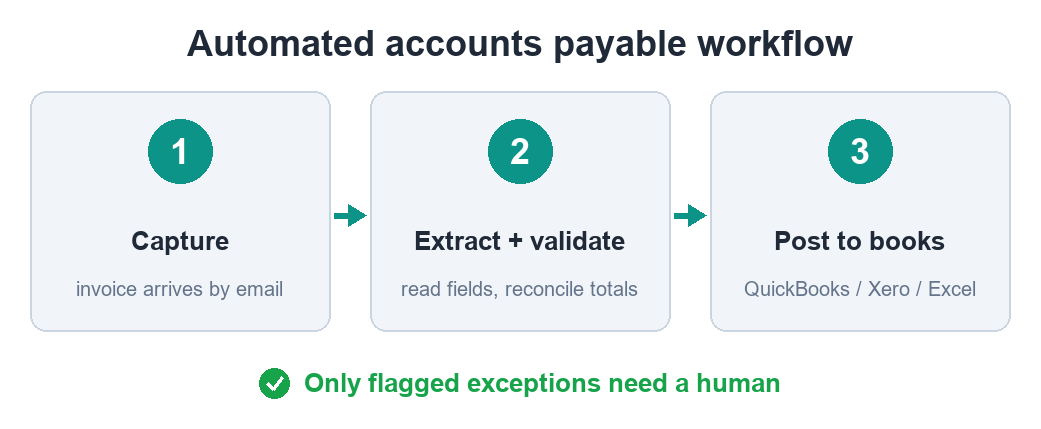
The same job, automated: the invoice is captured → AI vision reads any layout and returns structured fields in seconds → the numbers are checked (line items sum to the subtotal, subtotal plus tax equals the total, required fields present) → anything that reconciles flows straight through, and only genuine exceptions are flagged for a human. You go from typing every invoice to reviewing the handful that need a second look.
What to look for in an AP tool
For a small firm or a bookkeeper handling several clients, the features that matter are:
- Validation, not just extraction — the tool should reconcile totals and flag anomalies, not just hand you raw text you have to re-check.
- Any layout, any vendor — real invoices vary wildly; template-only parsers break on formats they were not built for.
- Scanned and digital PDFs — OCR for images plus clean parsing for native PDFs.
- Clean export — Excel/CSV or a direct push into QuickBooks or Xero, in the shape your books expect.
- Predictable cost — priced per document or per volume, so you can tell when it pays off.
- A human-review step — nothing posts to the ledger unchecked.
Three approaches compared
Manual entry costs nothing in software but ~2–5 min per invoice, errors slip in unnoticed, and it does not scale. Template OCR / DIY tools (Power Query, template parsers) help on clean, consistent invoices but break on new layouts and often return text you still have to clean. AI extraction with validation reads any layout, reconciles the numbers, scales to thousands, and costs a small amount per document — the only approach that actually removes the manual step rather than moving it.
Where it pays off
Below roughly 30–50 invoices a month, careful manual entry is often fine. Above that, automation usually pays for itself within the first month of saved time — and the more you process, the more lopsided the maths gets. For a bookkeeper across several clients, the win is compounding: less keying, fewer reconciliation surprises, and capacity to take on volume without adding hours.
Skip the manual work
DocAuto turns your invoices, receipts and bills into clean, validated spreadsheet data — every figure checked before you get it.
Send a document — free sample