Can ChatGPT convert PDF to Excel?
Short answer: sometimes. ChatGPT can turn a clean, digital PDF table into a spreadsheet — but it fails on scans, misaligns complex tables, and never validates the numbers. Here is what actually happens, and the safer options.
The short answer
Yes, for the easy case. With its data-analysis tool (code interpreter), ChatGPT reads a clean, digital PDF and writes Python behind the scenes to output an .xlsx you can download. For a one-off, simple table, it works. The problems start the moment the document is real-world.
Where it works
Clean, digital PDFs (text you can select) with a simple, single-page table. One file at a time. You upload it, ChatGPT converts it, you download the spreadsheet. Fine for a quick, low-stakes job.
Where it breaks
- Scanned PDFs and photos — these are images, so they need OCR. ChatGPT often misreads them or refuses.
- Multi-page or complex tables — columns drift, rows get dropped or merged, headers repeat.
- One at a time — no batch. Ten invoices means ten manual uploads.
- File limits & formatting — large or unusual PDFs get truncated or mangled.
- Privacy — you are uploading financial documents to a third party.
The real risk: no validation
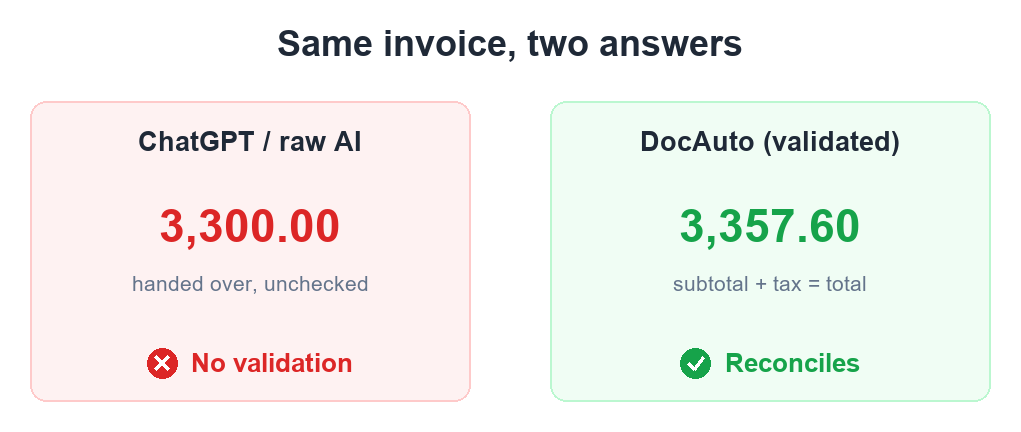
This is the one that costs money. ChatGPT gives you a number, not a checked number. If it reads a total of 3,357.60 as 3,300.00, it hands that over confidently — and it flows straight into your books. Extraction without reconciliation (line items sum to subtotal, subtotal plus tax equals total) is a guess dressed up as data. You would never know it was wrong until something didn't balance.
What to use instead
For a quick, clean PDF or CSV: our free in-browser converter — it runs on your device, so the file is never uploaded anywhere. For scanned files, mixed layouts, volume, or numbers you will post to the books: DocAuto extracts the data, validates that the totals reconcile, flags anything that doesn't, and returns clean data — or pushes it straight into QuickBooks or Xero.
Quick comparison
- ChatGPT — clean digital PDFs only · one at a time · no validation · uploads your data. Fine for a one-off.
- Free browser tool — clean digital PDF/CSV · instant · private (no upload) · no validation. Fine for a quick self-serve job.
- DocAuto — scanned + digital · any layout · batch · validated · straight to your accounting tool. For when the numbers have to be right.
Skip the manual work
DocAuto turns your invoices, receipts and bills into clean, validated spreadsheet data — every figure checked before you get it.
Send a document — free sample